
Your Mac has an app for everything. That’s the problem.
All the tools you need. One shortcut away.
Everything you copy. Every tool you need. History, screenshots that keep the words, a toolbox for any clip — one app, one shortcut. Private, instant, native.
Copy any text on this page. The shelf below catches it.
The film
Two minutes with PasteMate.
Everything it does, start to finish. Best with sound on.
Madeforeverykindofwork.
Coders keep snippets.
^(\d{4})-(\d{2})-(\d{2})$
const debounce = (fn, ms) => { let t; return (...a) => { clearTimeout(t); t = setTimeout(() => fn(...a), ms); }; };
git commit -m "ship it"
Whatever you keep, these cards are copyable. Try one.
Keep
Ifyoucancopyit,PasteMatekeepsit.
Meeting moved to Thursday 15:00, same room. Bring the Q3 numbers.

Screenshot 2026-07-12 at 11.02.48
~/Desktop
#76F1C5
rgb(118, 241, 197)
Rick Astley - Never Gonna Give You Up (Official Video)
https://youtu.be/dQw4w9WgXcQ

Human Interface Guidelines
https://developer.apple.com/design/human-interface-guidelines
git commit -m "ship it"
Can we hop on a quick call? (It was not quick.)
#FFD60A
rgb(255, 214, 10)
npm run build && say "done"
Per my last email (attached, again).
Roadmap v7 (final) (really this time)
Boarding now. See you on the other side.
Have you tried turning it off and on again?
Projects
~/Documents
pastemate.app
https://pastemate.app
quarterly-report-final-v2.pdf
~/Documents
Flight AF 1148, seat 14A, boards 18:35 from gate 22

IMG_0042.jpg
~/Downloads
=XLOOKUP(A2, Clips!A:A, Clips!C:C)
PasteMate Design System · Components
https://www.figma.com/design/pastemate-design-system
Idea: an app that finds the other AirPod.
NDA-signed-v3.pdf
~/Documents
#5AC8FA
rgb(90, 200, 250)
// TODO: remove before launch (added 2024)
rm -rf node_modules && npm install
It's not a bug, it's a feature. (It was a bug.)
Capture
Screenshots.Finallysmart.
⇧⌘2. Drag. Done. Keep the picture — or just the words.
Press ⇧⌘2 in any app. The screen dims, and PasteMate’s crosshair appears.
The picture is free — an area, a window, the whole screen. The words, QR codes and search inside images (every screenshot you copy, findable by what it says) come with the full version. All of it is read on this Mac, and nothing is sent anywhere.
Edit Screenshot
Ascreenshotstudio.Builtrightin.
Private details? Gone. One click. Then a background, soft corners and a shadow, and it is ready to send.
 Made with PasteMate
Look
Original
Cutout
Framed
Background
Adjust
Free screenshots carry a small PasteMate badge. Remove Badge…
A screenshot, exactly as it was taken.
Free with the essentials, and hiding private details is never paywalled. Free pictures carry a small PasteMate badge; the full version removes it and opens every background.
Search
Findanythingyouevercopied.
Start typing. Results narrow with every keystroke.
#76F1C5
rgb(118, 241, 197)
Meeting moved to Thursday 15:00, same room. Bring the Q3 numbers.
Invite list for the launch dinner: 18 confirmed, 4 pending
Invoice PM-2647 due July 24, net 30
Screenshot 2026-07-12 at 09.41
~/Desktop
Intelligence
Chatwithyourclips.
Ask about text, screenshots, and design frames — right where they live, with the AI you set up in Intelligence.
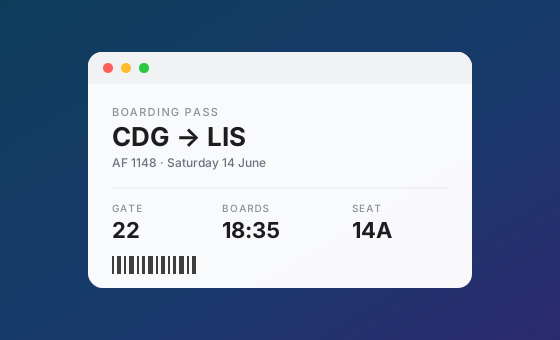
Screenshot 2026-06-11 at 14.09.22
~/Desktop
Suggested for this clip
Or skip the list and just ask.
On-device with Apple Intelligence by default; cloud engines are opt-in, with your own API key, and see only the clip you act on.
Tools
Atoolboxinsideyourclipboard.
Do the math. Clean the link. Shrink the photo. Fix the table. Dozens of tools. Zero apps to open.
1,280 * 12 + 340
A sum, worked out — and pasted plain, for a form or a cell.
On this Mac, offline. The original stays as it was; what you use becomes a new clip.
⌘K on any clip. Intelligence is the half with judgement; Tools is the half with a right answer — instant, offline, and the original is never touched. Part of the full version.
Organize
Tagit.Lockit.Findit.
Flight AF 1148, seat 14A, boards 18:35 from gate 22
vault-recovery: XK7Q-2MP9-TT41-8HD3
git commit -m "ship it"
Clips under a protected tag are encrypted with AES-256-GCM and hidden until you authenticate.
Everything else
Andallthelittlethings.
Room to breathe
Paste your way
Preview with Space
Write it once. Paste it forever.
Drag into anything
Select several clips
The paste you meant
Pick any color on screen
Rename, edit, undo
Picks up where you left off
Forget what you just copied
Screenshots, auto-copied
Lightweight or saved copy
Liquid Glass
Every shortcut, yours
Tidy by itself
Design assets stay editable
Quick Paste
iCloud syncComing soon
NothingleavesyourMac.Ever.
A clipboard is full of secrets: passwords, addresses, the message you almost sent. PasteMate stores it all on-device and collects nothing. Capture looks at the screen only when you ask and reads it on your Mac, and Edit Screenshot hides the emails and numbers in a picture before you send it. Capture Control pauses history while you handle something sensitive, or skips keys and card numbers once you turn its rules on. Intelligence sends only the clip you act on, only when you ask, with your own key. And when iCloud sync arrives soon, it's opt-in and stays inside your own Apple ecosystem: no third-party servers, ever.
100% local
Your history lives in a database on your Mac. No servers, no cloud, no tracking.
AES-256-GCM
Clips under a protected tag are encrypted at rest, with the key held in the system Keychain.
Touch ID
Protected clips stay hidden until you authenticate with Touch ID or your macOS password.
Payonce.Pasteforever.
Every tool you need, in one app, for one price. Once.
Free
$0
no trial, no card, no catch
- Your 5 most recent clips
- Full-text search and previews
- Capture pictures of anything on screen
- Edit Screenshot, with the essentials
- New Clip, for what you never copied
- All content types, drag and drop
- Every keyboard shortcut
PasteMate
Pay once$9.99
one-time purchase, yours forever
- Unlimited clipboard history
- Chat with any clip
- Tools for every clip
- Words from any capture
- Search inside images
- Pick any color on screen
- Every background, no badge
- Tags and filters
- Protected clips with Touch ID
- iCloud sync, coming soon
Unlock inside the app. Every purchase goes through the Mac App Store.
Compared
Howitstacksup.
The short version: pay once, keep everything, nothing leaves your Mac.
Prices checked against each product's own site in October 2026, features in July 2026. Paste also sells a lifetime unlock and syncs through your private iCloud; PastePal, to its credit, also charges once; Maccy is free and open source; Raycast's free plan keeps three months of history. PasteMate's iCloud sync ships soon: opt-in, your own Apple ecosystem, no third-party servers. All fine apps. Only one of them has ⌘I.
Questions, answered.
Anything else? Write to us at support@pastemate.app.
Yes. The free tier keeps your 5 most recent clips with full-text search, previews, drag and drop, and every keyboard shortcut. It also captures anything on screen as a picture, edits screenshots with the essentials, and writes new clips with ⌘N. A single one-time purchase unlocks everything else, forever.
One shortcut between you and everything you ever copied.
Free on the Mac App Store. macOS 14 or later.